Quick answer:
The right CNC plasma table software controls your cut quality, material waste, and overall shop efficiency. It’s the brain of your operation, translating designs into precise machine commands. Choosing incorrectly can lead to poor edge quality, excessive dross, and costly downtime. For most shops, the decision hinges on compatibility with your existing CAD software, the complexity of your parts, and the need for advanced features like nesting optimization or torch height control.
Selecting software for your CNC plasma table often feels like a hidden technical hurdle. You’ve invested in the machine, but the wrong software can bottleneck your entire production. This guide cuts through the complexity. We’ll explain what the software actually does, the key types available, and the practical factors that should drive your purchase decision.
Table of Contents
1. What CNC Plasma Software Actually Does
2. Main Types of Plasma Cutting Software
3. 5 Critical Factors for Your Software Choice
4. The Real Cost of Software (Beyond the Price Tag)
5. Integrating Software with Your Workflow
6. Common Questions About Plasma Software
01What CNC Plasma Software Actually Does
The software is the essential translator. It takes your part design and creates the toolpath—the precise instructions for the plasma torch. This involves more than just moving the torch.
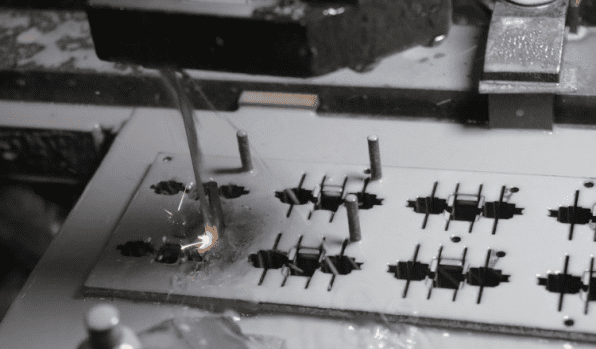
It calculates the correct cutting speed, pierce height, and kerf compensation. Kerf is the width of material removed by the plasma arc. The software must account for this to make parts the exact right size. Without proper software, your precision parts will always be slightly off.
Finally, it manages the machine interface, allowing you to run, pause, and monitor jobs. This control is central to both safety and production efficiency.
02Main Types of Plasma Cutting Software
Not all software packages are built the same. Your needs determine the best type. The main categories are bundled, standalone CAD/CAM, and dedicated high-end systems.
Bundled software often comes free with a new machine. It handles basic shapes and cuts but typically lacks advanced nesting capabilities or support for complex designs. It’s a start, but growing shops quickly outgrow it.
Standalone CAD/CAM software is purchased separately. You design in CAD, then import the file into the CAM module to generate toolpaths. This offers much greater flexibility for custom parts and intricate geometries.
Dedicated high-end systems combine design, nesting, and machine control into one seamless package. They focus intensely on optimizing material use and cut speed for high-volume production.
035 Critical Factors for Your Software Choice
Your choice should be driven by concrete operational needs, not just features. Start by evaluating your part complexity and material types. Simple shapes on mild steel have different demands than intricate artwork on aluminum.
Second, check compatibility. The software must work with your machine’s controller and your preferred CAD file formats (like .DXF or .DWG). Incompatibility creates immediate roadblocks.
Third, consider the user. Is the interface intuitive for your operators? Steep learning curves cost you time and money. Fourth,look at post-processor support. This is the software that tailors the generic toolpath to your specific machine.
Fifth, evaluate technical support. When a job won’t run, you need help fast. Providers like YPMFG can advise on software that matches their machines and your production goals.
04The Real Cost of Software (Beyond the Price Tag)
The purchase price is just one part of the total cost. Consider the cost of training your team. Complex software requires more training time, which is lost production.
Factor in potential material waste. Advanced nesting software can significantly reduce scrap by arranging parts more efficiently on a sheet. The savings in material often pay for the software upgrade.
Finally, account for productivity. Software that automates repetitive tasks or allows for faster programming directly increases your shop’s output and return on investment. A cheap option that slows you down is the most expensive choice.
05Integrating Software with Your Workflow
The software shouldn’t be an island. It needs to fit into your existing process. How does the design file get to the machine floor? A smooth workflow prevents errors and delays.
Look for software that allows design edits at the machine. Last-minute changes are common, and the ability to adjust a dimension without going back to the engineering office is invaluable.
Also, consider reporting features. Software that tracks cut time, material usage, and job history helps you quote more accurately and identify efficiency gains. Sending your project specifications to a partner like YPMFG for an engineering review can highlight workflow integration points you might miss.
Comparison of Software Approach by Shop Type
The table shows that your production model dictates the most effective software investment. Trying to use a basic system for complex work will frustrate you.
06Common Questions About Plasma Software
Can I use any CAD software?
Most plasma CAM software imports common vector files like .DXF. However, for the best results, a seamless link between your specific CAD program and the CAM software is ideal. Check for direct plug-ins or built-in compatibility.
What is “nesting” and why is it important?
Nesting is the automated arrangement of parts on a raw sheet to minimize waste. Good nesting software can increase material yield by 10-15%, which directly saves money on every sheet you buy.
Do I need different software for different materials?
The core software is the same, but you will need different cutting parameters (speed, amperage, kerf) for each material type. Quality software includes extensive material libraries with proven settings you can trust.
How often do I need software updates?
Major updates may come annually, often adding new features or machine support. Regular maintenance updates fix bugs. A subscription model usually includes updates, while a perpetual license may require separate purchase.
Making a Confident Software Decision
Choosing CNC plasma table software is a long-term decision that impacts daily operations. Focus on the factors that matter most to your shop’s output and bottom line: compatibility, usability, and true cost of ownership.
The goal is a system that feels like a natural extension of your team, not a constant obstacle. If your current process involves manual nesting or struggling with file conversions, an upgrade will likely pay for itself quickly.
Need help selecting the right software?
The best choice aligns with your machines, materials, and team skills. YPMFG supports clients through this evaluation. You can send your specifications for a review. Our engineers can discuss how different software options handle your specific part geometries and recommend a path that balances capability with practicality. Request an engineering consultation to compare your current solution.