Quick answer:
The best CAD CAM software for CNC depends on your part complexity, machine type, and in-house engineering capacity. There is no single “best” package for every shop. The right choice balances ease of use, toolpath control, material support, and post-processor compatibility. Many buyers overlook post-processor accuracy and software support responsiveness, which directly affect setup time and scrap rate. For custom CNC machining projects, compatibility with your CNC manufacturing services partner’s software is equally important.
If you are sourcing machined parts, your goal is to send a design file that your manufacturer can use without costly rework. Understanding how CAD CAM software operates helps you choose the right format and avoid delays.
Why CAD CAM Software Matters for CNC Machining
CAD CAM software bridges design and production. A solid model alone does not tell a CNC machine how to cut. The CAM module generates toolpaths, selects cutting strategies, and controls feeds, speeds, and tool changes.
For buyers of CNC machined parts, the software choice affects quoting accuracy, lead time, and part quality. If your file comes from a less common or older software version, the manufacturer may need to remodel or reprogram, adding cost and risk.
Many shops standardize on a few major platforms. Sending a file in a widely supported format reduces friction. YPMFG, for example, works with multiple CAD CAM formats and can help review your file for manufacturability before quoting.
Key Features to Evaluate
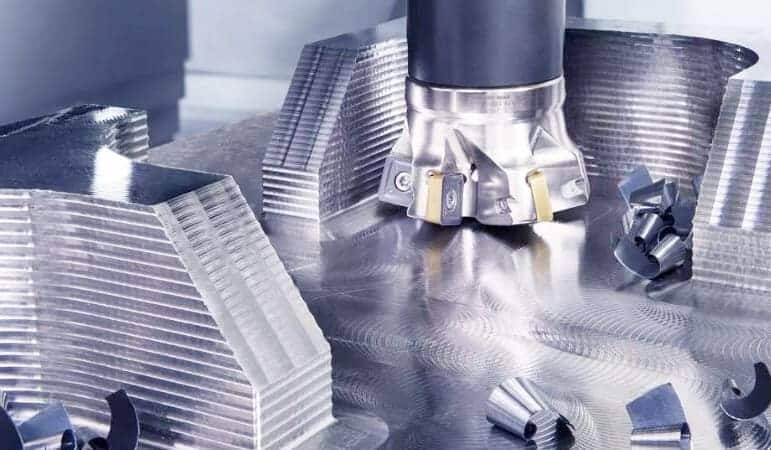
When evaluating CAD CAM software,focus on features that directly impact your parts and delivery.
Toolpath control and strategy variety
The software should support 2.5-axis, 3-axis, and multi-axis machining toolpaths. For complex geometries, look for adaptive clearing, trochoidal milling, and rest machining options.
Post-processor library and customization
A generic post-processor often produces incorrect code. The best software includes post-processors verified for specific machine models. Custom post-processor development indicates strong vendor support.
Material and tool databases
Integrated databases help set cutting parameters based on material type, hardness, and tool geometry. This reduces trial runs and improves surface finish.
Simulation and collision detection
Full machine simulation catches tool holder collisions, axis limits, and fixture interference before cutting starts. This is critical for expensive or tight-tolerance parts.
File format compatibility
The software should export STEP, IGES, STL, and native formats like SolidWorks or Fusion 360. This ensures your CNC machining service can open your file without conversion errors.
Common Software Types and Their Strengths
Different software packages serve different production environments. The table below compares common categories.
For most custom CNC machining projects, a mid-range integrated CAD/CAM package like Fusion 360 or Mastercam delivers the best balance of capability and cost. High-end packages become necessary when parts require tight tolerances, complex surface finishes, or multi-axis simultaneous cutting.
Software Selection Checklist for Buyers
Use this checklist when evaluating software for your in-house use or for sending files to a manufacturing partner.
[ ] Does the software support your machine type (mill, lathe, mill-turn, 5-axis)?
[ ] Are verified post-processors available for your machine models?
[ ] Can the software import common file formats (STEP, IGES, Parasolid)?
[ ] Does it include simulation with collision detection?
[ ] Is there a material database with recommended feeds and speeds?
[ ] Does the vendor offer training, documentation, and responsive support?
[ ] Can the software output toolpath data your manufacturer can use directly?
[ ] Is the licensing model affordable for your production volume?
[ ] Does the software receive regular updates for new machine controls?
[ ] Have you verified file compatibility with your CNC machining manufacturer before purchasing?
If you are not sure which software your parts require, you can send your specifications to YPMFG for a file review and compatibility check.
Questions Buyers Often Ask About CAD CAM for CNC
Do I need CAD CAM software to get a CNC part quote?
Not always. Many manufacturers accept STEP or IGES files and generate toolpaths internally. However, providing a native CAD CAM file with toolpath data can speed up quoting and reduce misinterpretation.
What is the easiest CAD CAM software for beginners?
Fusion 360 is widely considered beginner-friendly. It offers integrated design, CAM, and simulation in one interface, plus a large online community and tutorial library.
Can I use free CAD CAM software for production parts?
Free versions often lack advanced toolpath strategies, post-processor customization, and simulation. They work for simple prototypes but may not meet tight tolerance requirements for production runs.
How much does professional CAD CAM software cost?
Monthly subscriptions range from about $60 for Fusion 360 to several hundred dollars for advanced packages. Perpetual licenses for high-end software can cost $5,000 to $20,000 or more.
Why does my CAM file not run correctly on the machine?
The most common cause is an incorrect or generic post-processor. Even small differences in machine control logic can cause crashes or incorrect cuts. Always use a post-processor verified for your specific machine.
Should I let my manufacturer choose the software?
If your parts are complex or require multi-axis machining, it often makes sense to work with a manufacturer that supports multiple software formats. This avoids file conversion errors and reduces setup time.
Choosing the Right Approach for Your Project
The best CAD CAM software for CNC is the one that matches your part requirements, production volume, and manufacturer’s capabilities. For simple parts with standard geometries, a widely used integrated package works well. For high-complexity parts or tight tolerance specifications, a dedicated CAM system with strong simulation and multi-axis support is safer.
If you are outsourcing production, your priority should be file compatibility and post-processor accuracy. Sending a clean, well-documented CAD CAM file reduces quoting time and machining errors.
YPMFG supports a range of CAD CAM formats and can help review your design for manufacturability, material selection, and toolpath optimization. You can send your specifications or existing files for an engineering evaluation and a no-obligation quote.