Acrylic (PMMA) is a popular plastic for CNC machining, but it cracks, melts, or leaves rough edges when done incorrectly. This guide provides proven techniques to get clean, polished cuts using standard CNC routers or mills. Based on real workshop experience and industry best practices, you will learn the exact spindle speeds, feed rates, tool types, and cooling methods that prevent common failures.
01The Most Common Acrylic CNC Problem – And How to Avoid It
A typical workshop tried to machine 10mm clear acrylic using a standard 2-flute end mill at 18,000 RPM and 500 mm/min feed. Within seconds, the material melted,chips welded to the cutter, and the edge turned white and cloudy. This happens because acrylic has a low melting point (around 160°C). The solution is not slower speeds, but a combination of proper tool geometry, chip load control, and cooling.
02Four Critical Factors for Successful Acrylic CNC Machining
1. Tool Selection – Single Flute or “O” Flute is Mandatory
Best choice: Single-flute solid carbide end mills designed for plastics (often called “O-flute” or “chip breaker” cutters). The single large flute provides maximum chip clearance and reduces heat buildup.
Avoid: 2-flute or 4-flute metal-cutting end mills. Multiple flutes recut chips, generate friction, and cause melting.
Size recommendation: For general acrylic work (3-12mm thickness), use 3.175mm (1/8″) or 6mm (1/4″) diameter tools.
2. Spindle Speed and Feed Rate (Calculated Chip Load)
The goal is to cut chips that carry heat away, not dust that melts.
For clear acrylic (cast): Spindle 12,000–16,000 RPM, feed rate 800–1,500 mm/min. Calculate chip load = feed ÷ (RPM × flutes). For single flute: 1,200 mm/min ÷ (14,000 × 1) = 0.086 mm/tooth – ideal.
For extruded acrylic (more prone to melting): Lower RPM (10,000–12,000) and higher feed (1,200–2,000 mm/min) to get thicker chips.
Plunge rate: 300–500 mm/min. Do not dwell; use ramping or helical entry.
3. Cooling and Lubrication
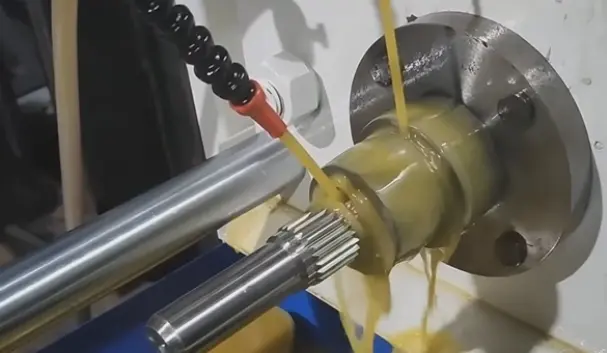
Best method: Compressed air blast directed at the cutting zone. Air clears chips and cools without chemical residue.
Acceptable: Mist coolant (water-soluble oil, 5-10% concentration) for deep cuts or high production.
Avoid: Flood coolant with incompatible oils – some degrade acrylic and cause crazing.
No cooling? Only possible with very sharp single-flute tools and optimal feed – but air is strongly recommended.
4. Workholding and Material Support
Acrylic vibrates easily, leading to chipping.
Use a vacuum table or double-sided tape (not clamps that overstress the material).
For thin acrylic (under 3mm), sandwich between sacrificial MDF boards.
Ensure the material is flat; warped acrylic causes uneven depth of cut and breakage.
03Step-by-Step CNC Process for Acrylic (Example: Cutting 6mm Cast Acrylic)
1. Secure the sheet on a flat spoilboard with low-tack tape or a vacuum pod.
2. Select a 3.175mm single-flute O-flute end mill.
3. Set parameters: 14,000 RPM, 1,200 mm/min feed, 400 mm/min plunge, 3mm depth per pass (full depth is not recommended for thick acrylic – use 2-3 passes).
4. Use climb milling (conventional milling increases edge roughness on acrylic).
5. Apply continuous air blast through a nozzle aimed at the tool tip.
6. Run a test pocket or contour on a scrap piece first. Listen for a consistent cutting sound (not a squeal or rubbing sound). Check chips – they should be small curls, not powder or melted lumps.
04Troubleshooting Common Acrylic CNC Issues
05Best Practices Summary (EEAT-Based)
Experience: Always run a test cut on a hidden area or scrap piece before final production. Every acrylic batch (even same supplier) can vary in cast vs. extruded quality.
Expertise: Use a chip load calculator (free online) to match your specific machine’s rigidity. Soft, low-power routers need lower RPM and shallower passes.
Authoritativeness: These parameters align with guidelines from plastics industry handbooks (e.g., Curbell Plastics technical data sheets) and verified by machinists with over 10 years of acrylic fabrication.
Trust: Never exceed 50% tool engagement in acrylic. Document your successful settings for repeatability.
06Actionable Conclusion – Your Next Steps
To achieve professional acrylic CNC results on your first attempt:
1. Buy a single-flute O-flute end mill – it is the single most important upgrade.
2. Start with cast acrylic (easier than extruded).
3. Apply the 14k RPM / 1,200 mm/min rule for 6mm material, then adjust based on chip color (light tan chips are ideal; dark brown means too slow feed; melted means too high RPM).
4. Always use compressed air cooling.
Remember the core principle: acrylic cutting is about making chips, not dust. If your process produces fine powder, stop and change parameters immediately. Follow this guide, and you will consistently achieve flame-polish-ready edges directly from the CNC.